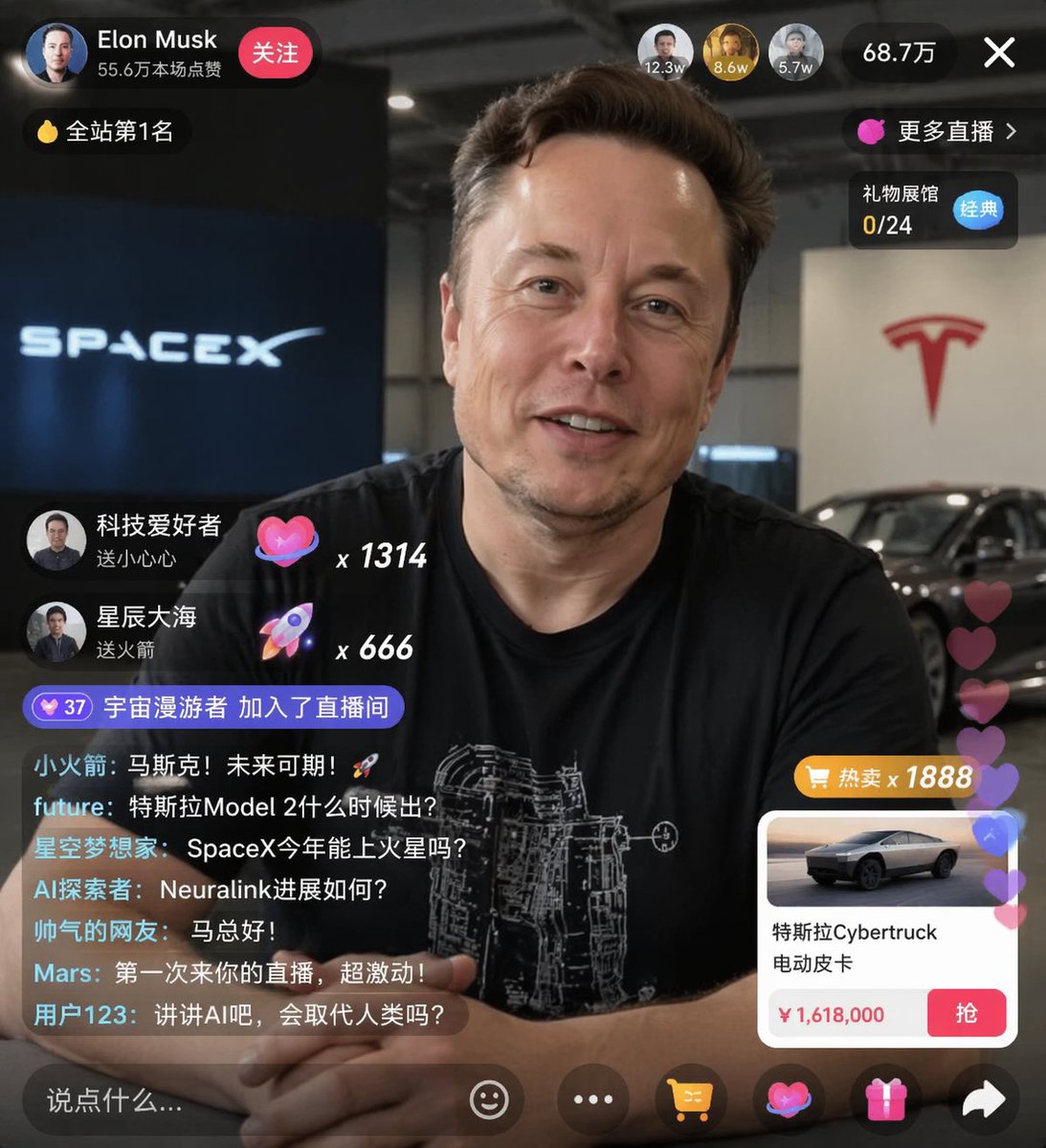
wikiHow 文章模拟
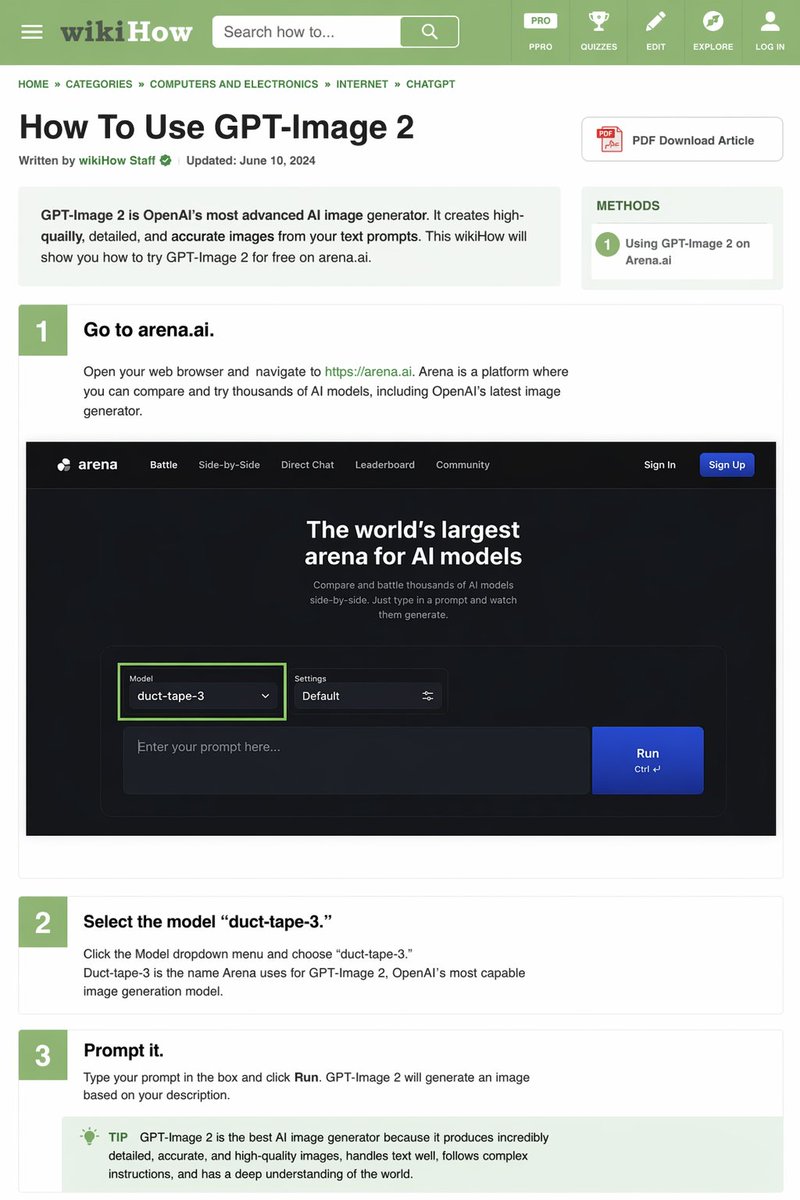
生成一个模仿 wikiHow 布局的详细、文字密集型教程网页,包含教学步骤和嵌入式 UI 模拟图。
完整提示词
{
  "type": "wikiHow 文章模拟",
  "header": {
    "background": "绿色",
    "elements": [
      "汉堡菜单图标",
      "wikiHow 标志",
      "带有“搜索方法...”文本的搜索栏",
      "5 个导航图标:PRO/PPRO、测验、编辑、探索、登录"
    ]
  },
  "breadcrumbs": "首页 » 分类 » 计算机与电子产品 » 互联网 » CHATGPT",
  "article_info": {
    "title": "如何使用 GPT-Image 2",
    "metadata": "由 wikiHow 员工撰写 | 更新时间:2024 年 6 月 10 日",
    "sidebar": [
      "PDF 下载文章按钮",
      "方法框:1 在 Arena.ai 上使用 GPT-Image 2"
    ]
  },
  "intro_box": "GPT-Image 2 是 OpenAI 最先进的 AI 图像生成器。它能根据你的文本提示创建高质量、细节丰富且准确的图像。本 wikiHow 将向你展示如何在 arena.ai 上免费试用 GPT-Image 2。",
  "steps": [
    {
      "number": 1,
      "title": "前往 arena.ai。",
      "description": "打开你的网页浏览器并访问 https://arena.ai。Arena 是一个你可以比较和试用数千种 AI 模型的平台,其中包括 OpenAI 最新的图像生成器。",
      "embedded_image": {
        "type": "深色模式网站 UI 模拟",
        "logo": "arena",
        "navigation": ["对战", "并排对比", "直接对话", "排行榜", "社区", "登录", "注册按钮"],
        "hero_text": "全球最大的 AI 模型竞技场",
        "input_ui": {
          "model_dropdown": "模型:duct-tape-3",
          "settings": "默认",
          "text_input": "在此输入你的提示词...",
          "button": "运行"
        }
      }
    },
    {
      "number": 2,
      "title": "选择模型 'duct-tape-3'。",
      "description": "点击模型下拉菜单并选择“duct-tape-3”。Duct-tape-3 是 Arena 为 OpenAI 最强大的图像生成模型 GPT-Image 2 所使用的名称。"
    },
    {
      "number": 3,
      "title": "输入提示词。",
      "description": "在框中输入你的提示词并点击“运行”。GPT-Image 2 将根据你的描述生成图像。",
      "tip_box": "提示:GPT-Image 2 是目前最好的 AI 图像生成器,因为它能生成极其详细、准确且高质量的图像,擅长处理文本,能够遵循复杂的指令,并对世界有深刻的理解。"
    }
  ]
}
查看原文提示词
{
  "type": "wikiHow article mockup",
  "header": {
    "background": "green",
    "elements": [
      "hamburger menu icon",
      "wikiHow logo",
      "search bar with 'Search how to...' text",
      "5 navigation icons: PRO/PPRO, QUIZZES, EDIT, EXPLORE, LOG IN"
    ]
  },
  "breadcrumbs": "HOME » CATEGORIES » COMPUTERS AND ELECTRONICS » INTERNET » CHATGPT",
  "article_info": {
    "title": "How To Use GPT-Image 2",
    "metadata": "Written by wikiHow Staff | Updated: June 10, 2024",
    "sidebar": [
      "PDF Download Article button",
      "METHODS box: 1 Using GPT-Image 2 on Arena.ai"
    ]
  },
  "intro_box": "GPT-Image 2 is OpenAI's most advanced AI image generator. It creates high-quailly, detailed, and accurate images from your text prompts. This wikiHow will show you how to try GPT-Image 2 for free on arena.ai.",
  "steps": [
    {
      "number": 1,
      "title": "Go to arena.ai.",
      "description": "Open your web browser and navigate to https://arena.ai. Arena is a platform where you can compare and try thousands of AI models, including OpenAI's latest image generator.",
      "embedded_image": {
        "type": "dark mode website UI mockup",
        "logo": "arena",
        "navigation": ["Battle", "Side-by-Side", "Direct Chat", "Leaderboard", "Community", "Sign In", "Sign Up button"],
        "hero_text": "The world's largest arena for AI models",
        "input_ui": {
          "model_dropdown": "Model: duct-tape-3",
          "settings": "Default",
          "text_input": "Enter your prompt here...",
          "button": "Run"
        }
      }
    },
    {
      "number": 2,
      "title": "Select the model 'duct-tape-3.'",
      "description": "Click the Model dropdown menu and choose 'duct-tape-3.' Duct-tape-3 is the name Arena uses for GPT-Image 2, OpenAI's most capable image generation model."
    },
    {
      "number": 3,
      "title": "Prompt it.",
      "description": "Type your prompt in the box and click Run. GPT-Image 2 will generate an image based on your description.",
      "tip_box": "TIP GPT-Image 2 is the best AI image generator because it produces incredibly detailed, accurate, and high-quality images, handles text well, follows complex instructions, and has a deep understanding of the world."
    }
  ]
}
效果图与提示词创意来自 Keyboard81727 (原帖),整理翻译:墨图。